
> ## Documentation Index
> Fetch the complete documentation index at: https://labs.laer.ai/llms.txt
> Use this file to discover all available pages before exploring further.

# Navigate a Project space

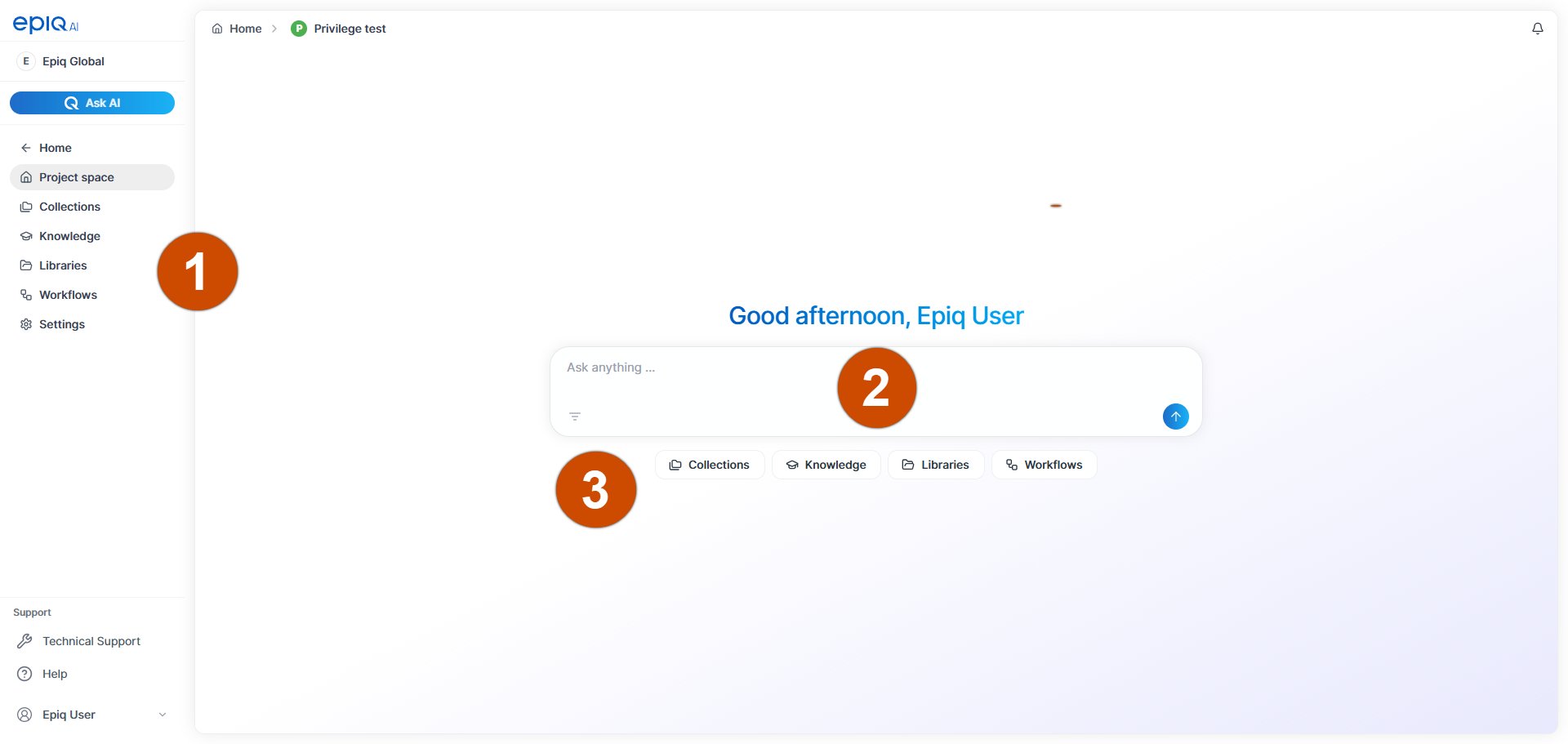
When you select a project from the breadcrumb menu or from **Recent Projects** on the Home page, you land in the project space. The project space is the top level of a project and gives you access to all components it contains.

Use the project space to move between collections, knowledge, libraries, workflows, and project settings. You can also start a conversation with Ask AI based on the documents in your project.

<Frame>
  <img src="https://mintcdn.com/epiqai/5-Xpsc0dxL4Alr7A/images/image-10-1.png?fit=max&auto=format&n=5-Xpsc0dxL4Alr7A&q=85&s=b6021689292a12ced819645e4643d638" alt="" width="1920" height="911" data-path="images/image-10-1.png" />
</Frame>

<table><thead><tr><th width="103" align="center">Number</th><th>Name</th><th>Description</th></tr></thead><tbody><tr><td align="center">​<img src="https://mintcdn.com/epiqai/5-Xpsc0dxL4Alr7A/images/image-8-1.png?fit=max&auto=format&n=5-Xpsc0dxL4Alr7A&q=85&s=8679c605f9f4cd06e360b63acc00082b" alt="" data-size="line" width="102" height="99" data-path="images/image-8-1.png" /></td><td>Project space menu</td><td><ul><li>The main menu for project actions.</li></ul></td></tr><tr><td align="center">​</td><td><ul><li>Collections</li></ul></td><td><ul><li>Go to the <a href="/work-with-projects/collections/overview">collections</a> that are part of the project.</li></ul></td></tr><tr><td align="center">​</td><td><ul><li>Knowledge</li></ul></td><td><ul><li>Go to the project's <a href="/work-with-projects/projects/navigate-a-project-space">knowledge</a> layer that contains information about persons and organizations.</li></ul></td></tr><tr><td align="center">​</td><td><ul><li>Libraries</li></ul></td><td><ul><li>Go to the project's <a href="/work-with-projects/libraries/overview">libraries</a>.</li></ul></td></tr><tr><td align="center">​</td><td><ul><li>Workflows</li></ul></td><td><ul><li>Go the project's <a href="/work-with-projects/workflows/overview">workflows</a>.</li></ul></td></tr><tr><td align="center">​</td><td><ul><li>Settings</li></ul></td><td><ul><li>Access admin-level <a href="/work-with-projects/project-settings/overview">project settings</a> (if you have permission).</li></ul></td></tr><tr><td align="center">​<img src="https://mintcdn.com/epiqai/5-Xpsc0dxL4Alr7A/images/image-9-1.png?fit=max&auto=format&n=5-Xpsc0dxL4Alr7A&q=85&s=dcdd3d3ab1a898ec698e7580b5868b25" alt="" data-size="line" width="100" height="102" data-path="images/image-9-1.png" /></td><td>Prompt box</td><td><ul><li>Type a prompt to start a conversation with <a href="/use-ask-ai/ask-ai/overview">Ask AI</a> using your project documents.</li></ul></td></tr><tr><td align="center">​<img src="https://mintcdn.com/epiqai/5-Xpsc0dxL4Alr7A/images/image-12.png?fit=max&auto=format&n=5-Xpsc0dxL4Alr7A&q=85&s=f3cd3c910e04726d40f7c620004ae0e2" alt="" data-size="line" width="159" height="151" data-path="images/image-12.png" /></td><td>Access buttons</td><td><ul><li>Select a button to navigate to Collections, Knowledge, Libraries, or Workflows.</li></ul></td></tr></tbody></table>

​