> ## Documentation Index
> Fetch the complete documentation index at: https://labs.laer.ai/llms.txt
> Use this file to discover all available pages before exploring further.
# System requirements
On-Prem Installation
AIDA can be installed on-premise and deployed directly onto your cloud/virtualized infrastructure or on your own hardware. AIDA itself runs in a containerized environment. AIDA supports using existing NFS, and persistent cloud storage such as AWS EBS, Google Cloud Persistent Disk, and Azure Disk Storage.
## Software requirements
* Linux-based 64-bit OS: Red Hat Enterprise Linux 8 or newer, CentOS 8 or newer, Ubuntu 18.04 or newer, Debian Buster or newer.
* Install Docker and Docker-Compose on the host system.
* For GPU deployment, install NVIDIA GPU drivers and CUDA toolkit on the host system. Install NVIDIA Container Toolkit to run GPU-accelerated Docker containers on NVIDIA GPUs.
## AIDA deployment components
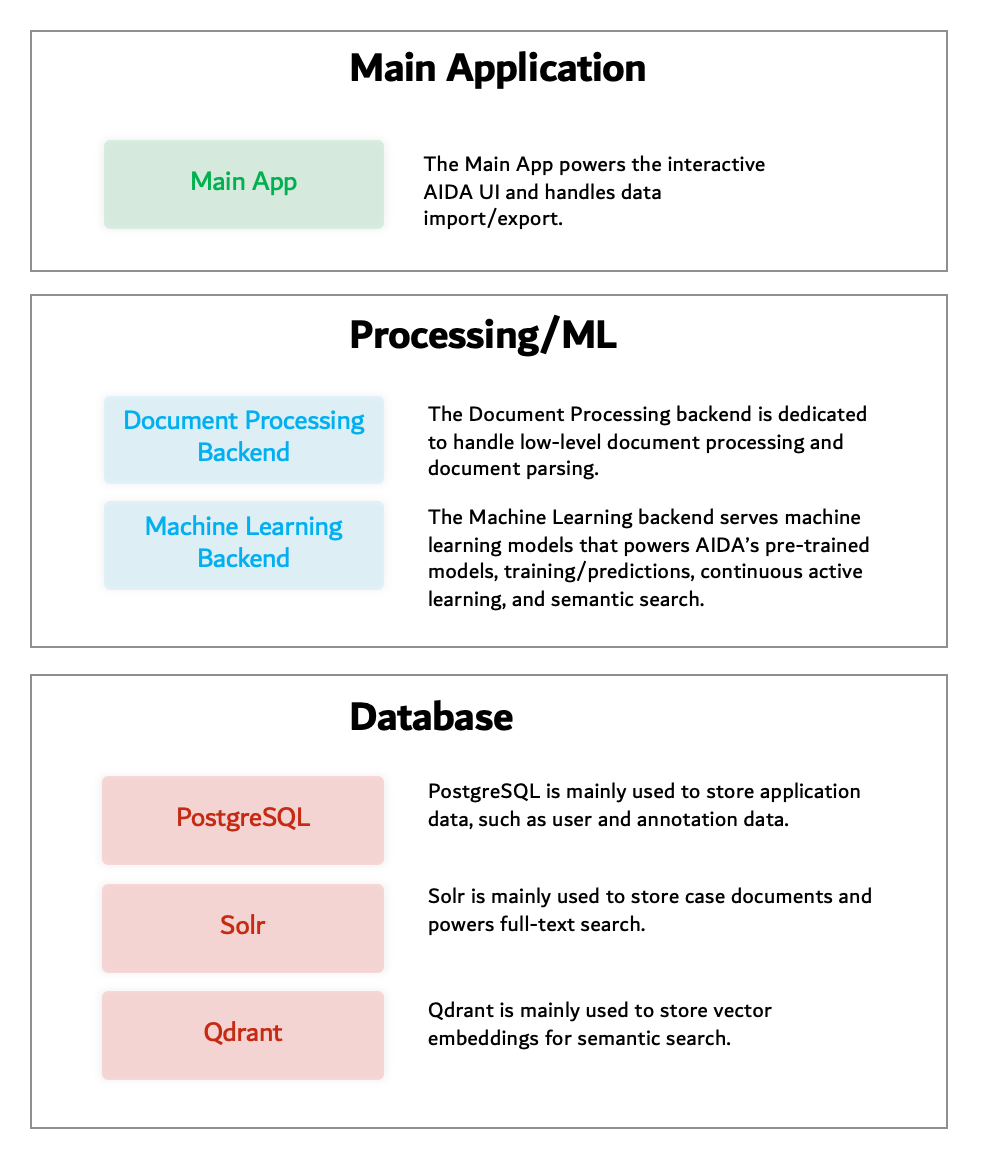
This high-level architecture diagram outlines the main components of an AIDA deployment. Each component is running as a separate docker container.
 ### Main App
The Main App provides the core services in AIDA, including document annotations/reviews, document search/analytics, interactive UI for model prediction/analytics, as well as data import/export.
### Document processing backend
The document processing backend handles low-level document processing, including metadata extraction, text extraction, document conversion, image OCR, and document parsing.
### Machine learning backend
The machine learning (ML) backend is responsible for hosting pre-trained models, performing model training and predictions, and supporting continuous active learning and semantic search.
### PostgreSQL
PostgreSQL is used for storing and managing annotation data, including metadata associated with the annotations and other relevant information that is useful for machine learning.
### Solr
Solr provides full-text search capabilities and indexing of case documents. AIDA uses Solr to support boolean search (using Lucene or dtSearch syntax) of case text and metadata. AIDA also integrates Solr with its machine learning backend to support semantic search.
### Qdrant
Qdrant is an open-source vector database designed to store and search high-dimensional vectors. AIDA uses it to store vector embeddings for case documents and to support semantic search, where search queries and documents are represented as vectors in a high-dimensional space.
## Hardware recommendations
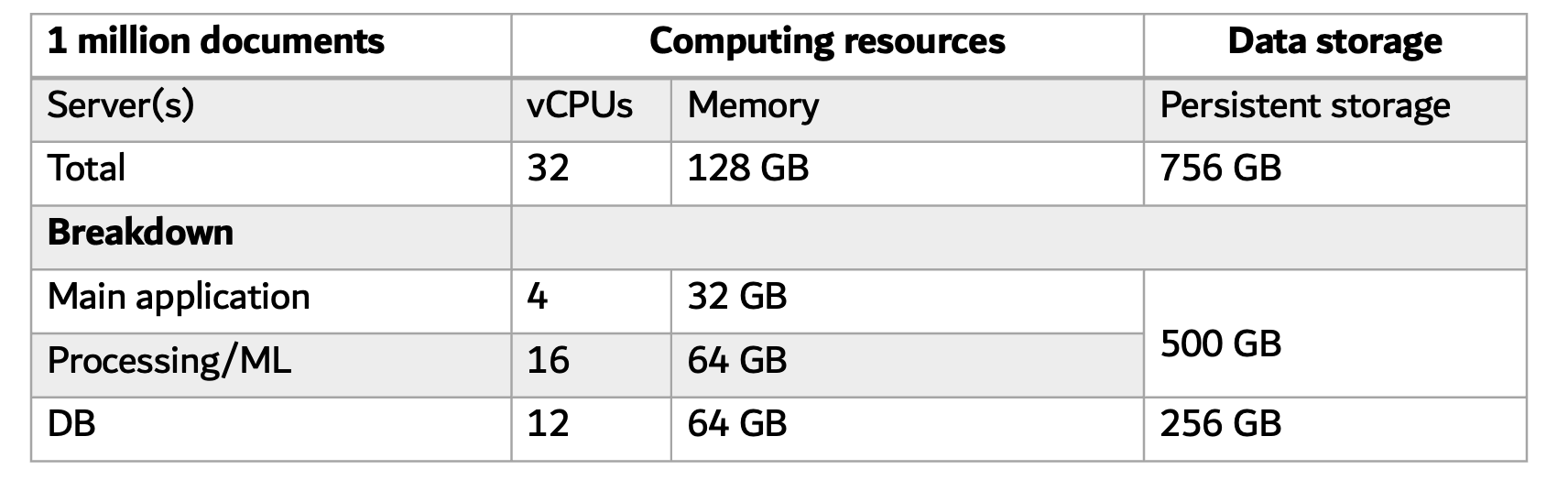
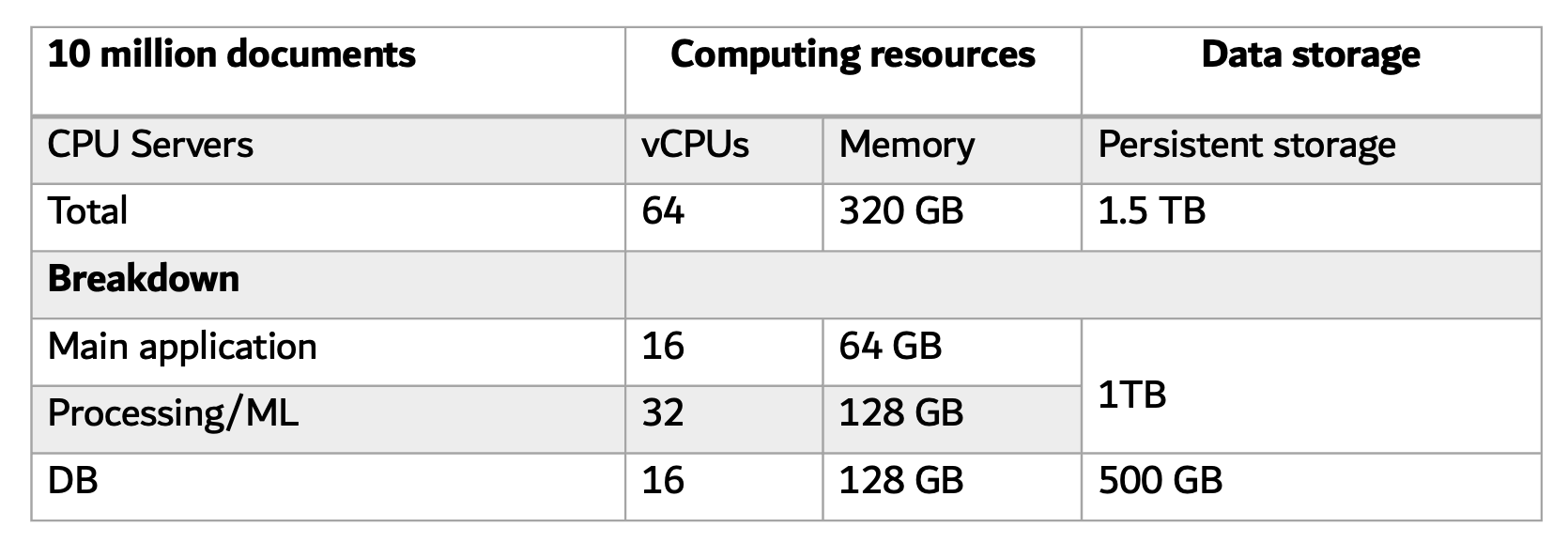
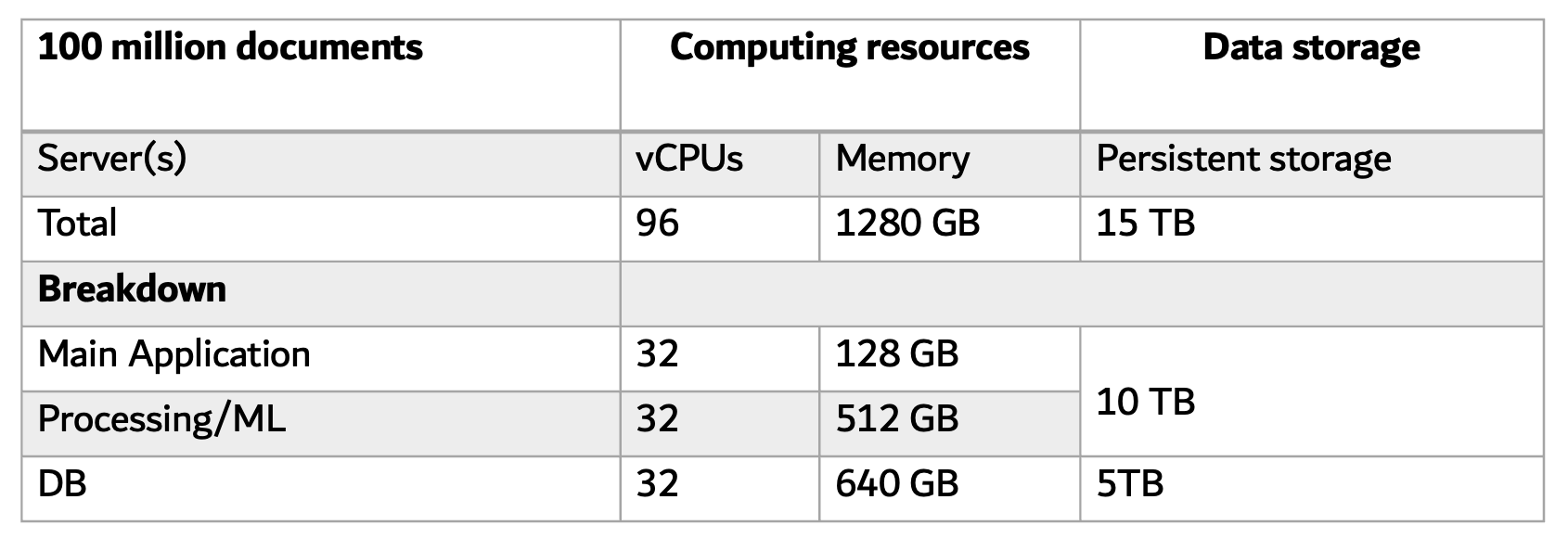
The usage of CPU, RAM, and storage space can vary based on the volume of the case data, the number of users, and AIDA's features being used.
AIDA can be deployed on a single server or multiple servers depending on factors such as the size of the dataset, the number of concurrent users, and the required processing power. For smaller datasets and fewer users, a single server deployment may be sufficient.
However, as the size of the dataset and the number of concurrent users increases, deploying AIDA on multiple servers can provide additional processing power and improve performance and scalability. For example, you could run the main application on one server, the data processing and machine learning components on a second server, and the databases on a third server.
### GPU recommendation
It is strongly recommended that AIDA's machine learning backend runs on a Graphics Processing Unit (GPU) environment. GPUs can significantly accelerate training and inference times, e.g., 5-10x faster than CPUs. Using AIDA's pre-trained models requires at least 40 GB of GPU memory, e.g., A100 40GB. AIDA also offers more advanced conversational features that require GPUs with at least 160GB memory (e.g., 2 x NVIDIA A100 80GB) to host the models.
### Deployment examples
Below are three examples of how AIDA can be deployed:
### Main App
The Main App provides the core services in AIDA, including document annotations/reviews, document search/analytics, interactive UI for model prediction/analytics, as well as data import/export.
### Document processing backend
The document processing backend handles low-level document processing, including metadata extraction, text extraction, document conversion, image OCR, and document parsing.
### Machine learning backend
The machine learning (ML) backend is responsible for hosting pre-trained models, performing model training and predictions, and supporting continuous active learning and semantic search.
### PostgreSQL
PostgreSQL is used for storing and managing annotation data, including metadata associated with the annotations and other relevant information that is useful for machine learning.
### Solr
Solr provides full-text search capabilities and indexing of case documents. AIDA uses Solr to support boolean search (using Lucene or dtSearch syntax) of case text and metadata. AIDA also integrates Solr with its machine learning backend to support semantic search.
### Qdrant
Qdrant is an open-source vector database designed to store and search high-dimensional vectors. AIDA uses it to store vector embeddings for case documents and to support semantic search, where search queries and documents are represented as vectors in a high-dimensional space.
## Hardware recommendations
The usage of CPU, RAM, and storage space can vary based on the volume of the case data, the number of users, and AIDA's features being used.
AIDA can be deployed on a single server or multiple servers depending on factors such as the size of the dataset, the number of concurrent users, and the required processing power. For smaller datasets and fewer users, a single server deployment may be sufficient.
However, as the size of the dataset and the number of concurrent users increases, deploying AIDA on multiple servers can provide additional processing power and improve performance and scalability. For example, you could run the main application on one server, the data processing and machine learning components on a second server, and the databases on a third server.
### GPU recommendation
It is strongly recommended that AIDA's machine learning backend runs on a Graphics Processing Unit (GPU) environment. GPUs can significantly accelerate training and inference times, e.g., 5-10x faster than CPUs. Using AIDA's pre-trained models requires at least 40 GB of GPU memory, e.g., A100 40GB. AIDA also offers more advanced conversational features that require GPUs with at least 160GB memory (e.g., 2 x NVIDIA A100 80GB) to host the models.
### Deployment examples
Below are three examples of how AIDA can be deployed:
 ### GPU Servers
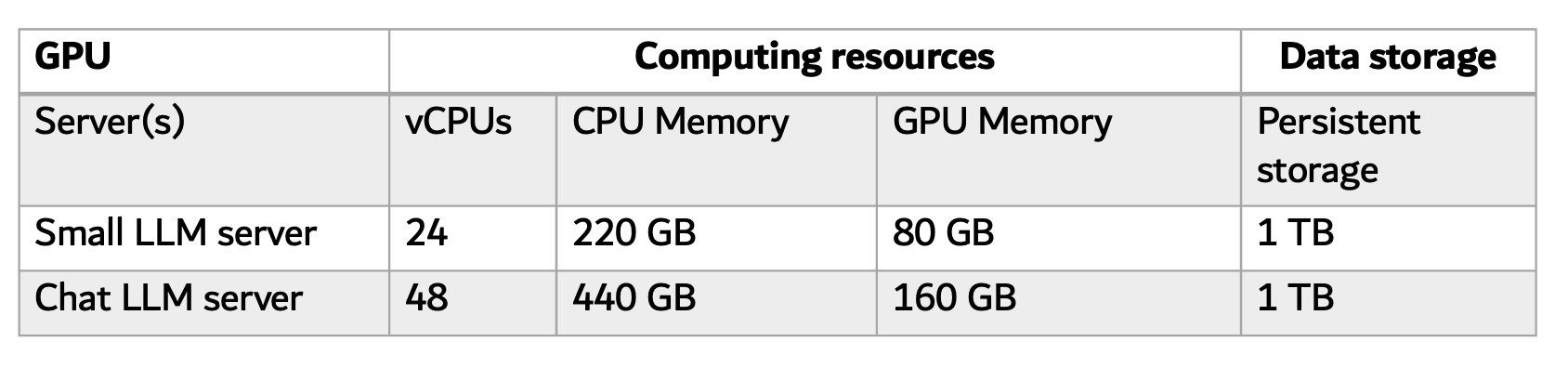
Below are examples of the GPU deployment. The Small LLM server is required and the Chat LLM server is optional.
### GPU Servers
Below are examples of the GPU deployment. The Small LLM server is required and the Chat LLM server is optional.
 ### Processing Time
Below are the expected processing times for loading documents (text and metadata) in AIDA using the system config from Table 2 with 32 vCPUs and 128 GB memory. Note that AIDA utilizes multi-processing to parallelize the processing time. It can be further sped up with more CPUs and Memory resources.
| Number of documents | Processing Time |
| ------------------- | --------------- |
| 10,000 | 20 min |
| 100,000 | 2 hours |
| 1,000,000 | 10 hours |
| 10,000,000 | 60 hours |
### General considerations
* For every 100 GB of text, allocate at least 64 GB of memory to the DB server.
* It is highly recommended to allocate at least 64 GB of CPU memory to the Processing/ML server. The Processing/ML components support batch processing so the memory requirements do not necessarily grow linearly as the size of the dataset increases. For example, 512 GB memory may be sufficient for processing 1TB of text.
* The main application and the document processing and ML components share the same data volume using NFS share. It is recommended to reserve 5 times the size of the source text for the DB storage and 10 times the size of the source text for the other storage shared by the main app and the processing/ML components.
* The memory requirement for the main application mainly depends on the number of concurrent users. In general, it is recommended to reserver 32GB RAM for every 100 concurrent users.
## AIDA network diagram
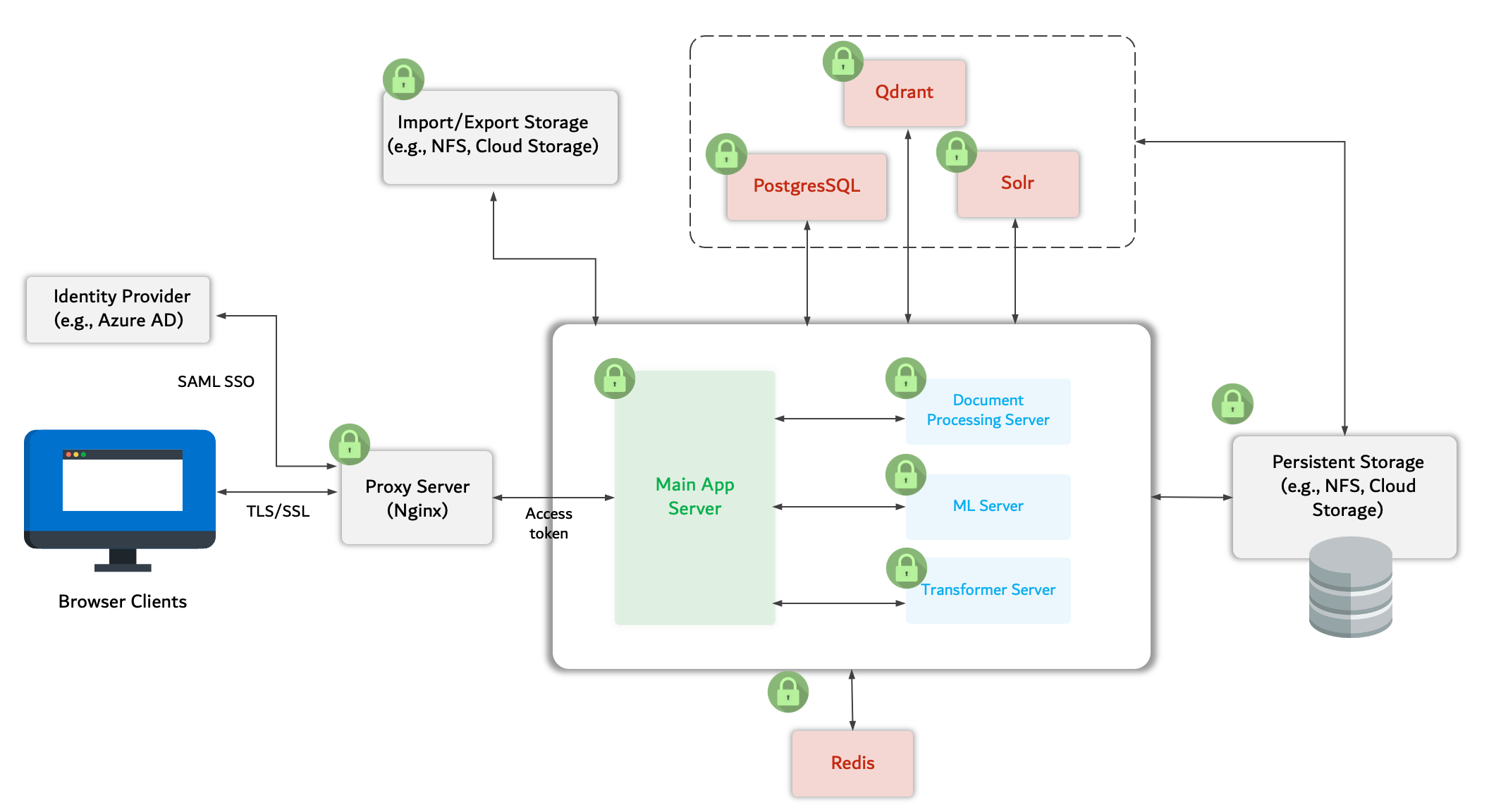
Each AIDA component is running as a docker container and communicates through a Docker Compose network or between multiple servers using HTTPS connections. All network communication is secured using SSL/TLS encryption.
User access to the main app is authenticated and authorized using access tokens specific to a user account. Users can also log in to AIDA by authenticating through an identity provider (IdP) such as Azure Active Directory (Azure AD) using SAML single sign-on protocol. After successful authentication, users’ HTTPS connections are directed to the Main app.
### Processing Time
Below are the expected processing times for loading documents (text and metadata) in AIDA using the system config from Table 2 with 32 vCPUs and 128 GB memory. Note that AIDA utilizes multi-processing to parallelize the processing time. It can be further sped up with more CPUs and Memory resources.
| Number of documents | Processing Time |
| ------------------- | --------------- |
| 10,000 | 20 min |
| 100,000 | 2 hours |
| 1,000,000 | 10 hours |
| 10,000,000 | 60 hours |
### General considerations
* For every 100 GB of text, allocate at least 64 GB of memory to the DB server.
* It is highly recommended to allocate at least 64 GB of CPU memory to the Processing/ML server. The Processing/ML components support batch processing so the memory requirements do not necessarily grow linearly as the size of the dataset increases. For example, 512 GB memory may be sufficient for processing 1TB of text.
* The main application and the document processing and ML components share the same data volume using NFS share. It is recommended to reserve 5 times the size of the source text for the DB storage and 10 times the size of the source text for the other storage shared by the main app and the processing/ML components.
* The memory requirement for the main application mainly depends on the number of concurrent users. In general, it is recommended to reserver 32GB RAM for every 100 concurrent users.
## AIDA network diagram
Each AIDA component is running as a docker container and communicates through a Docker Compose network or between multiple servers using HTTPS connections. All network communication is secured using SSL/TLS encryption.
User access to the main app is authenticated and authorized using access tokens specific to a user account. Users can also log in to AIDA by authenticating through an identity provider (IdP) such as Azure Active Directory (Azure AD) using SAML single sign-on protocol. After successful authentication, users’ HTTPS connections are directed to the Main app.
 ## AIDA data flow diagram
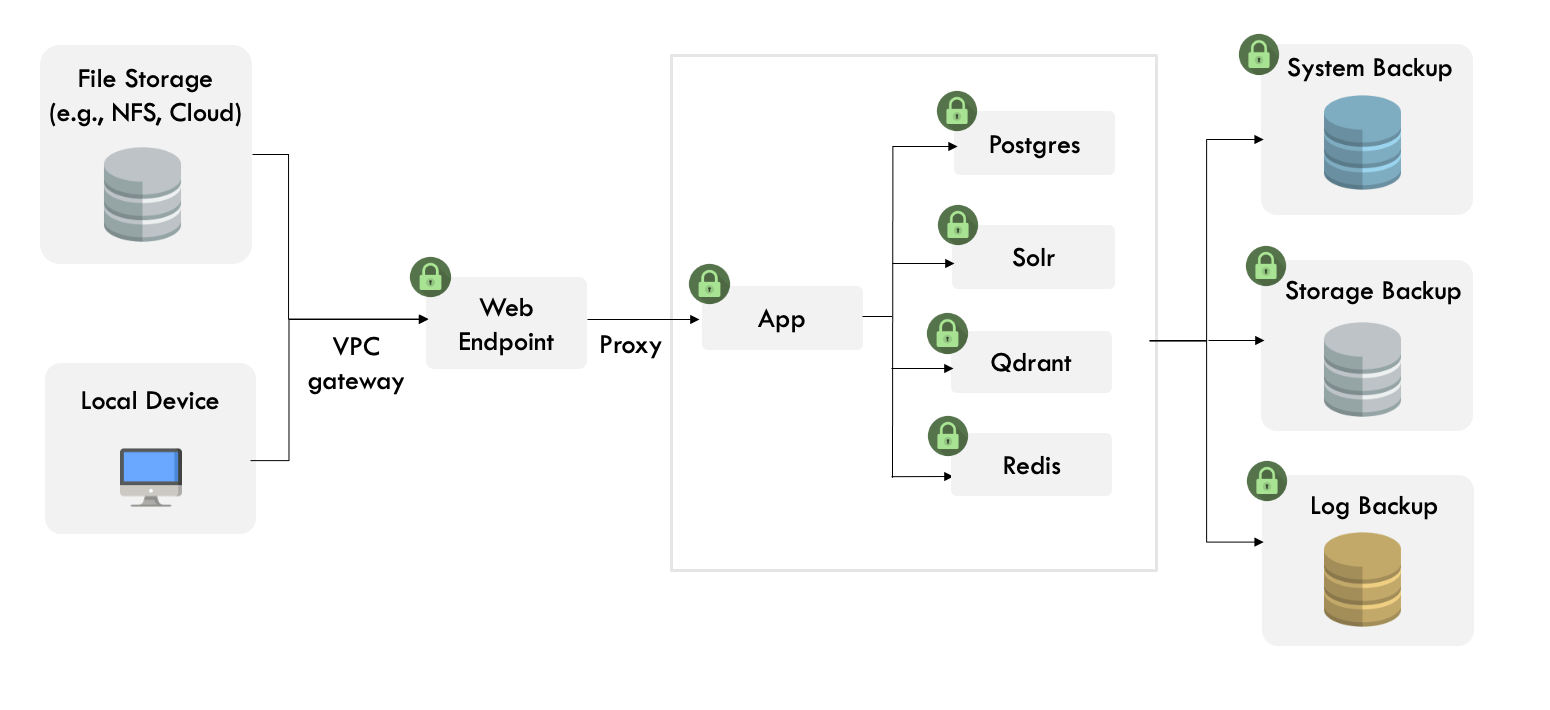 All data in AIDA is encrypted in transit and at rest using TLS 1.2+ protocols and AES256 encryption.
Data in AIDA is stored in databases (PostgreSQL, Solr, and Qdrant) and persistent file storages (e.g., NFS or cloud storages like AWS EBS volumes). AIDA does not permit direct access to the databases from the users. The app uses API to access the data stored in the databases with verified and proxied requests using specific HTTP verbs and Basic Authentication headers. All databases (PostgreSQL, Solr, Qdrant) have SSL mode enabled and require valid certificates. AIDA also does not permit direct access to the data stored in the persistent file storages. Access to data is authenticated and authorized the same way as access to other services using access tokens specific to a user account. Access tokens can be revoked at any time.
All user-created data are associated with the specific user account using unique identifiers. The data is logically separated from other users’ data using these unique IDs. Admin users can create projects and add users and can control other users' access to different projects based on their assigned roles.
Data can be imported into AIDA through local devices or cloud storage (e.g., AWS S3 buckets). All uploaded data is associated with the unique ID that is linked to the account of the specific user. Admin users have full control of who has access to the data in AIDA and whether or when the data should be purged from the AIDA. AIDA does not store or use any of the data created or uploaded by the users without users' approval.
All data in AIDA is encrypted in transit and at rest using TLS 1.2+ protocols and AES256 encryption.
Data in AIDA is stored in databases (PostgreSQL, Solr, and Qdrant) and persistent file storages (e.g., NFS or cloud storages like AWS EBS volumes). AIDA does not permit direct access to the databases from the users. The app uses API to access the data stored in the databases with verified and proxied requests using specific HTTP verbs and Basic Authentication headers. All databases (PostgreSQL, Solr, Qdrant) have SSL mode enabled and require valid certificates. AIDA also does not permit direct access to the data stored in the persistent file storages. Access to data is authenticated and authorized the same way as access to other services using access tokens specific to a user account. Access tokens can be revoked at any time.
All user-created data are associated with the specific user account using unique identifiers. The data is logically separated from other users’ data using these unique IDs. Admin users can create projects and add users and can control other users' access to different projects based on their assigned roles.
Data can be imported into AIDA through local devices or cloud storage (e.g., AWS S3 buckets). All uploaded data is associated with the unique ID that is linked to the account of the specific user. Admin users have full control of who has access to the data in AIDA and whether or when the data should be purged from the AIDA. AIDA does not store or use any of the data created or uploaded by the users without users' approval.